
Important note: In this article, I describe the progression of my experience — starting with my first rather disappointing test results with the Ultrawide module and ending with a later, relatively satisfying outcome. I therefore recommend reading the full article from start to finish.
You can also find both of my videos covering my impressions of the Ultrawide module for the Pimax Crystal Super on my YouTube channel: Crystal Super Ultrawide Review.
At first, the premise seemed straightforward: an Ultrawide module that, according to Pimax, can deliver up to 140 degrees of horizontal field of view sounds exactly like what many VR enthusiasts have been asking for — more peripheral vision, more presence, more immersion.
After several weeks of intensive testing and usage, however, the picture became far more complex.
Measurements and First Disappointment
My first FOV tests were based on the same consistent methodology I also used for the other Pimax Crystal Super modules. I measured everything with the tool “WIMFOV,” always using the exact same setup: identical facial interface, manually adjusted correct IPD, and reproducible testing conditions.
My initial comparison results looked like this:
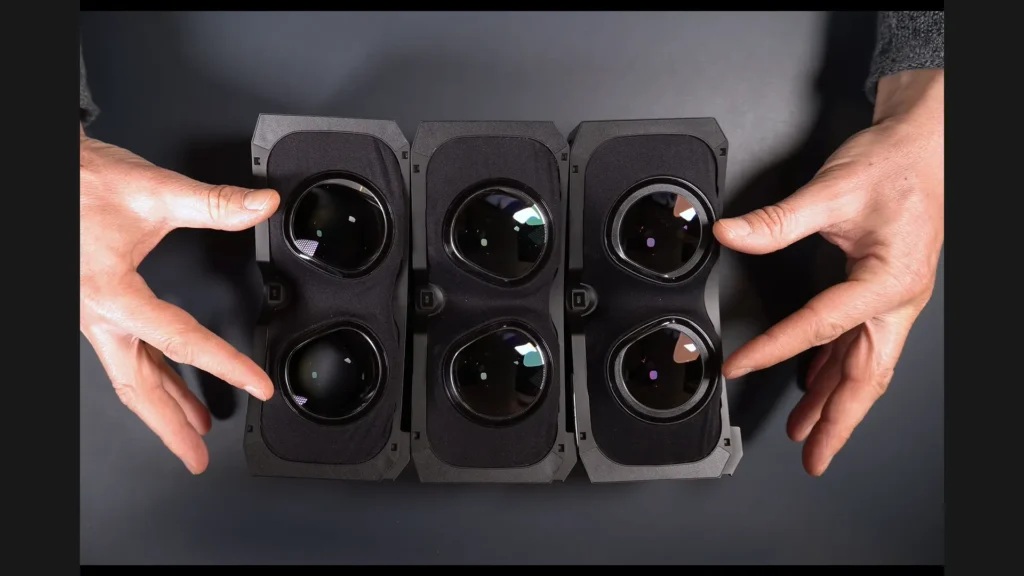
- 50 PPD module: 126° horizontal
- 57 PPD module: 102° horizontal
- Ultrawide module: 124° horizontal
That was the point where things became difficult.
In my setup, the Ultrawide module ended up performing almost on the same level as the 50 PPD module — while simultaneously offering lower stereo overlap. That directly contradicts the expectation created by the name “Ultrawide.”
Looking for the Pimax Crystal Super?
Visit my Pimax Buying Guide for an overview of all current Pimax headsets, optical engines, recommended accessories, and the latest product links.
Workarounds Instead of a Real Solution
During discussions with Pimax, I was initially advised to use a thinner facepad and intentionally increase my IPD setting. This did, in fact, increase the measured FOV — in my case to roughly 132 degrees.
The issue is that this setup became noticeably more straining for my eyes and moved away from what would actually be the correct optical configuration. A properly calibrated IPD creates a stable stereoscopic image. If the IPD is intentionally offset, image quality suffers and the eyes have to compensate much more aggressively.
For me, that is not a real solution — it feels more like a workaround with side effects.
The direct comparison here is particularly interesting: with the 50 PPD module, the FOV remains stable regardless of whether I change the facepad or the IPD. The Ultrawide module, on the other hand, reacts much more sensitively to those adjustments. That is the crucial difference.
Firmware, Community Feedback, and New Insights
After my initial tests, I continued investigating the issue, experimented with different firmware versions, and spent a lot of time discussing the topic with the community. For anyone interested in diving deeper, I highly recommend the related Reddit discussion.
This leads to a more nuanced overall picture.
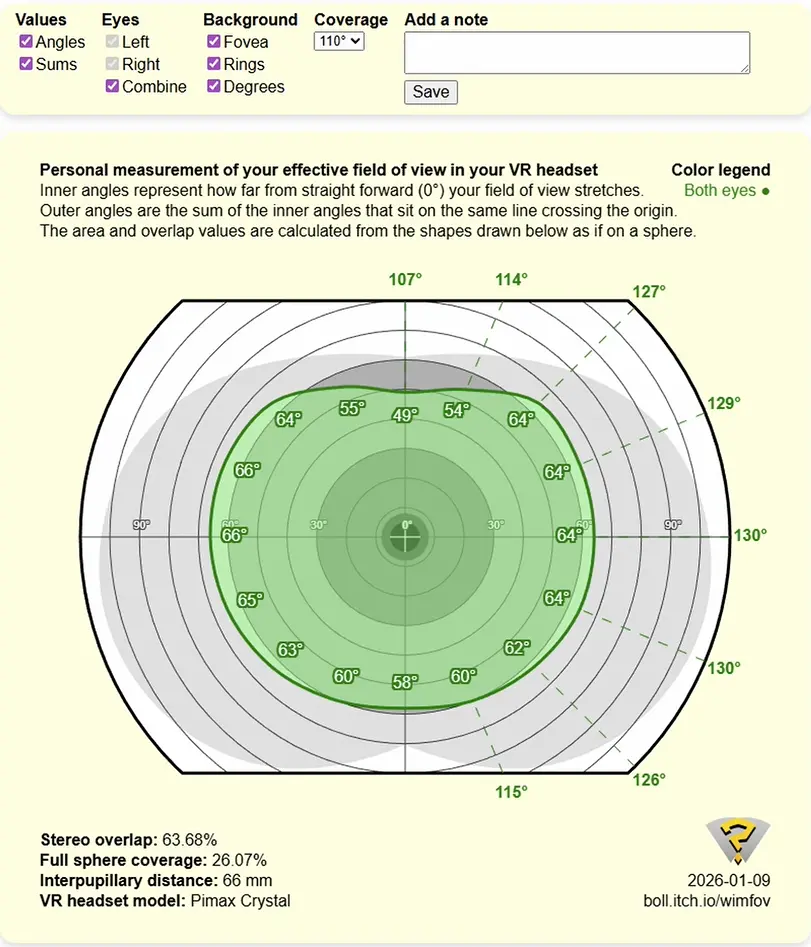
With firmware version 1.0.11, I can now reach roughly 130 degrees of horizontal FOV — definitely an improvement, but still below the advertised 140 degrees.
Other users report similar numbers, while some actually seem to achieve results that feel much closer to a true ultrawide experience. There does not appear to be one consistent user experience at this point.
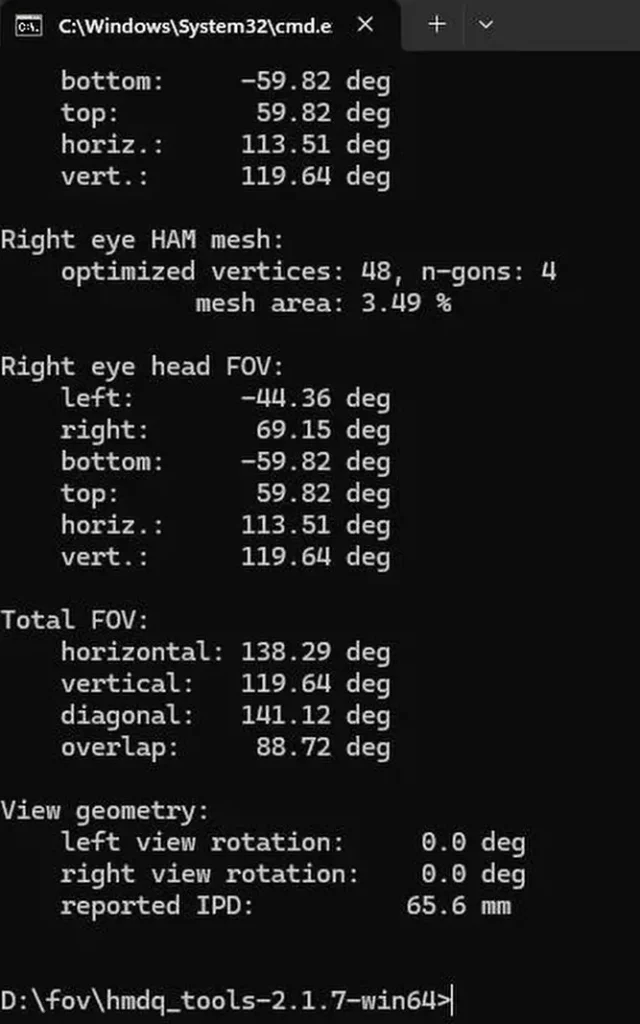
Comparisons using tools like HMDQ also show that the theoretical potential of the module is around 138 degrees. The problem is that this potential does not fully translate into real-world usage for every user.
That leads to an important conclusion:
There is currently a noticeable gap between what is technically possible and what users actually experience in practice.
Dependence on Individual Setup
One of the key factors seems to be the individual IPD range of the user. Distortion profiles — the software-based correction of lens distortion — are always optimized for certain ranges. My impression is that the current profile works well for some users, but not for others.
That would explain why experiences vary so dramatically.
This is also what currently separates the Ultrawide module from the other modules of the Crystal Super: it does not yet deliver a consistent experience across different user setups.
Comparison to the Other Modules
When placing the Ultrawide module directly next to the 50 PPD module, the overall picture becomes fairly clear:
- The FOV difference is smaller than expected
- The Ultrawide module offers less stereo overlap
- The gain in peripheral vision is real, but not nearly to the extent the name suggests
For a module that is explicitly defined by its wider field of view, that gap simply feels too small.
Potential Use Cases
Despite its limitations, there are scenarios where the Ultrawide module can absolutely play to its strengths.
Particularly in simulation games, an expanded peripheral field of view can be useful — for example, to better notice movement in the corners of your vision or to create a stronger sense of speed and spatial awareness.
In certain gameplay situations where peripheral awareness matters, a larger FOV can theoretically provide advantages as well.
Recommendation and Current Verdict
Anyone interested in the Ultrawide module currently cannot avoid testing it personally. The experience depends too heavily on the individual setup.
One important recommendation: get your eyes as close to the lenses as possible, for example by using a thinner facepad. That alone can noticeably improve the result — even if it may not necessarily be the most comfortable solution.
If the result works well for you, the module may absolutely be a good fit. If not, it is worth keeping the return option in mind.
At this stage, the Ultrawide module feels like a product with real potential that is still not fully utilized on the software side. There are strong indications that future distortion profile adjustments could improve the experience further.
Until then, my impression remains mixed: more FOV than at the beginning, yes — but for me personally, still not quite the clear-cut ultrawide experience I had hoped for.
Interested in the Pimax Crystal Super?
You´ll find all current Pimax headsets, optical engines, recommended accessories , and the latest product links in my Pimax Buying Guide.